How to write a real estate drip email campaign (with templates)

Quick Answer
How do you write a real estate drip email campaign?
A real estate drip campaign is a sequence of 7–10 pre-written emails sent automatically after a lead enters your CRM, spaced across a 90-day window and continuing with monthly touches for up to 18 months. Each email should deliver a specific value — a market update, a listing match, a pre-approval resource — not a sales pitch. The most effective sequences are triggered by lead behavior (a listing view, a saved search) and segmented by buyer stage: active buyers get touches every 3–5 days, while long-timeline leads get monthly market updates. Email marketing returns an average of $36 for every $1 spent, per Litmus, making a well-built drip sequence one of the highest-ROI activities available to an agent.
Key Takeaways
- Email marketing returns an average of $36 for every $1 spent across all industries, per the Litmus 2025 State of Email Survey — higher than paid social ($2.50), Google Ads ($8), or direct mail, making drip sequences the best cost-per-touch nurture tool available to agents.
- The majority of real estate leads take 6–12 months to convert, per iHomefinder's lead nurturing research — meaning agents who abandon follow-up after 30 days are giving up on the majority of the pipeline they paid to generate.
- Personalized subject lines are 26% more likely to be opened than generic ones, per research cited in the American Marketing Association — and emails referencing a lead's specific property interest or search behavior double that lift.
- A three-email automated nurture sequence built for a Chicago real estate professional produced a 43% buyer engagement boost and a 43% click-through rate on the second email, with zero unsubscribes, per a Luxury Presence 2025 case study.
- Segmented email campaigns generate 50% higher click-through rates than untargeted blasts, per GetResponse's 2024 Email Marketing Benchmarks — making lead-stage segmentation (active buyer vs. long-timeline) the single highest-leverage change to any existing drip sequence.
Danielle Okafor runs a solo practice in Atlanta, Georgia. In January 2025 she had 87 leads in her CRM from the previous six months — web inquiries, open house sign-ins, and Zillow connections — and had personally followed up with 23 of them. The other 64 had heard nothing since their first week. In March, one of those 64 leads texted her out of nowhere: "Hey, we met at your open house in August. We're ready to buy now — still in the business?" The buyer closed on a $540,000 home in May. Danielle's commission: $13,500. She found out after the fact that the buyer had also called two other agents that day; she happened to be the first to respond to the text. The open house sign-in sheet that had felt like paperwork became a $13,500 check — but only because the buyer remembered her name eight months later.
This article gives you the exact 7-email framework and word-for-word templates to build that memory in every lead from day one — without any manual work after setup. You'll understand why each email exists in the sequence, what subject lines get opened, how to configure behavioral triggers that fire based on what your leads actually do, and how to automate the entire sequence so it runs while you're showing homes.
What makes a real estate drip campaign work
Most agent drip campaigns fail for one of three reasons: they pitch too early, they go quiet too quickly, or they send the same generic content to every lead regardless of stage. The fixes are straightforward once you understand what a drip sequence is actually doing — and it is not selling. A drip campaign's job is to keep your name as the most trusted real estate voice in a lead's inbox until their timing aligns with yours.
The economic case for this patience is clear. Litmus's 2025 State of Email Survey found that email returns an average of $36 for every $1 spent — a figure that holds across industries and dwarfs paid social (average $2.50 return per dollar) and Google Ads (average $8). For a real estate agent whose average commission sits around $10,000–$15,000 per transaction, even a single additional conversion per year from an automated drip sequence produces an ROI that no other marketing channel can match on the same time investment.
Stat: Email marketing returns an average of $36 for every $1 spent — the highest ROI of any digital marketing channel. — Litmus State of Email Survey, 2025
The patience argument is supported by iHomefinder's lead nurturing research, which found that the majority of real estate leads take 6–12 months to convert from inquiry to transaction. The average agent stops following up after 2–3 attempts, well before most leads are ready to engage. The agents who maintain a structured 18-month nurture sequence — even with a simple once-a-month email — are collecting the leads every other agent already abandoned. When a life event (job change, growing family, inheritance) finally triggers the buying decision, the agent who was consistently in the inbox is the one who gets the call.
Three principles govern every email in a functioning drip sequence. First: deliver value before you ask for anything. Market updates, neighborhood data, and listing matches are value; "Are you ready to schedule a showing?" in email two is not. Second: write like a person, not a platform. Leads can identify template language immediately; emails written in plain text, from a named person, with one specific question at the end, consistently outperform HTML newsletters. Third: segment by stage. A lead who saved 14 listings yesterday needs different messaging than someone who filled out a contact form nine months ago and hasn't been back since. Segmented campaigns generate 50% higher click-through rates than untargeted blasts, per GetResponse's 2024 Email Marketing Benchmarks.
The 7-email framework
The sequence below covers the first 90 days of a new lead relationship and is designed for a buyer inquiry or web form submission. Adjust the specific content for seller leads (replace listing matches with a home value estimate; replace pre-approval resources with a seller net sheet). The schedule and logic stay identical.
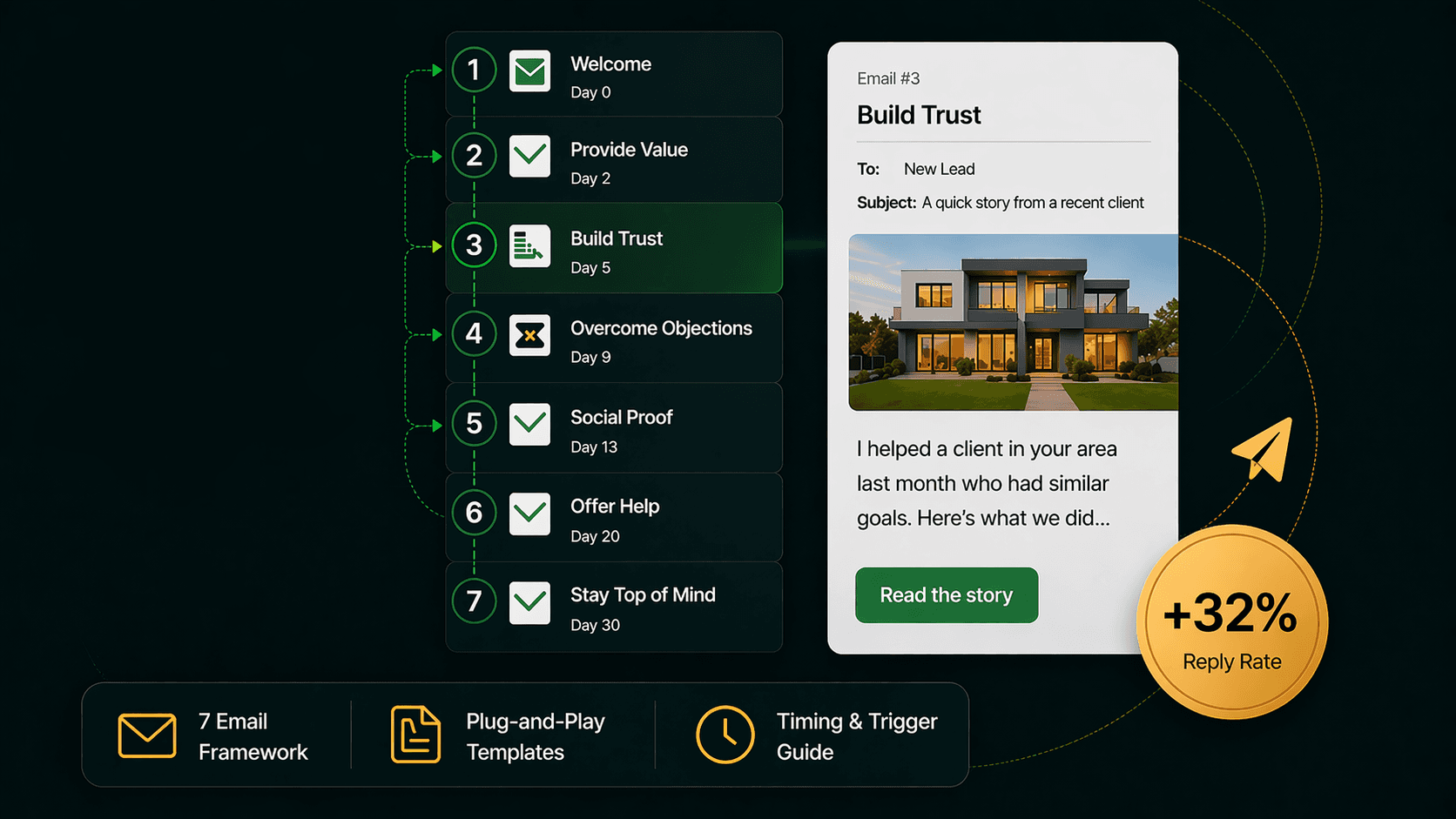
Email 1 — Sent immediately on lead capture (Day 0). Purpose: confirm the connection exists and deliver something immediately useful. This email should go out within minutes of the inquiry, not hours. Its job is to prevent the lead from assuming no one is on the other end of the form they just submitted. Include: a sentence referencing the specific property or search they used, one direct question about their timeline, and a link to their personalized home search (if you have IDX on your website). Length: 5–7 sentences. No images, no logo header — plain text performs better at this stage.
Email 2 — Day 3. Purpose: position yourself as a local market expert. Send a brief market snapshot for the neighborhood or price range the lead searched. Three data points: median days on market, median list-to-sale price ratio, number of active listings in their criteria. This is the email that separates agents who understand the market from agents who just have access to the MLS. One question at the end: "Are you working with a lender yet, or would a referral be helpful?"
Email 3 — Day 7. Purpose: address the single biggest friction point for online leads — pre-approval. A large share of leads who don't respond to follow-up are not disinterested; they are embarrassed that they haven't started the mortgage process. Send a brief, empathetic note: "A lot of buyers I work with start their search before they've spoken to a lender — that's completely normal. Here's a quick guide on what to expect from the pre-approval process and two lenders I've worked with who move fast." No pressure. One link to a helpful resource.
Email 4 — Day 14. Purpose: social proof. Share a brief client story — no names, just scenario — that mirrors the lead's situation. "I worked with a buyer last year who was in your exact position: pre-approved, watching the [neighborhood] market, not quite sure if it was the right time. Here's what we found and how we got there." Two sentences on the outcome. No ask; just evidence that you've done this before for someone like them.
Email 5 — Day 30. Purpose: listing match. Pull 2–3 active listings that match the criteria the lead used when they first searched. Be specific about why each one fits: "This one is $12,000 under your upper limit and has the two-car garage you mentioned." The word "mentioned" only works if you captured that detail from their search behavior or a prior conversation. Specificity drives clicks; generic listing blasts drive unsubscribes.
Email 6 — Day 45. Purpose: re-engagement for non-responders. If the lead has not clicked, replied, or visited your website since the sequence started, this email changes the approach. Subject line: "Still the right time?" Body: two sentences acknowledging that timing is personal, one direct offer to pause the sequence if they'd prefer ("just reply 'pause' and I'll check in in 90 days"), and a low-friction ask: "If you are still looking, I have 3 new listings that fit your criteria I'd love to share." Giving leads control over the frequency paradoxically increases engagement.
Email 7 — Day 60, then monthly. Purpose: long-term nurture. From this point forward, send a monthly market update for the lead's target area: median price change, notable new listings, one hyperlocal insight ("The Westover Park area saw two bidding wars last week — here's what that means for buyers watching that zip code"). This email runs automatically until the lead converts, unsubscribes, or you manually remove them. iHomefinder's research found that agents who maintain 18–24 months of consistent contact close leads that every other agent abandoned at month three.
7 templates you can use today
The templates below are written in plain-text format. Copy them into your CRM's email editor and replace bracketed fields with your dynamic variables. Do not add images, logos, or HTML buttons — the email should look like it was written by a person, not assembled by a platform. A Luxury Presence 2025 case study found that a 3-email automated sequence written in this style produced a 31% open rate on email one and a 43% click-through rate on email two, with zero unsubscribes.
Template 1 — Immediate response (Day 0)
Subject: Re: [property address or "your home search on [your website name]"]
Hi [first name],
Thanks for reaching out — I saw you were looking at homes in [area/price range] and wanted to get back to you personally rather than send an automated welcome email.
Quick question: are you hoping to be in a new home before the end of the year, or is your timeline a bit more flexible?
Either way, I put together a live search for properties matching what you were looking at: [IDX search link]
Let me know what you find — happy to talk through anything.
[Your name]
[Phone number]
Template 2 — Market snapshot (Day 3)
Subject: Quick market update for [neighborhood/zip]
Hi [first name],
Since you're watching the [area] market, I wanted to share three numbers that matter right now:
— Median days on market: [X] days (down from [Y] last month)
— List-to-sale price ratio: [X]% (meaning most homes are selling [above/below] asking)
— Active listings matching your criteria: [X] homes
The short version: [one sentence honest interpretation — e.g., "inventory is tighter than it was 60 days ago, which means good homes are moving fast."]
Are you working with a lender yet? If not, I have a couple of referrals I trust who can get you pre-approved quickly without it feeling like a sales call.
[Your name]
Template 3 — Pre-approval resource (Day 7)
Subject: Something most buyers don't know before they start
Hi [first name],
Most buyers I work with start searching online before they've spoken to a lender — and there's nothing wrong with that. Knowing what you love helps you know what you can afford once you're in the process.
If you're ready to get serious, here's what to expect: [link to a brief pre-approval guide or your own blog post on the topic]
Two lenders I've sent clients to recently and both have been smooth to work with: [Name 1, phone/email] and [Name 2, phone/email]. No pressure — just people I'd call myself.
[Your name]
Template 4 — Client story (Day 14)
Subject: A buyer in your exact situation last spring
Hi [first name],
Thought this might be useful context as you figure out your timeline.
I worked with a buyer last year who was watching the [area] market for about four months before making a move. Pre-approved, knew what they wanted, just unsure whether to wait for prices to shift. We found a three-bed in [neighborhood] that had been sitting for 22 days — priced right, no bidding war — and they closed in 32 days. They're in the house now.
The market doesn't always cooperate with perfect timing. But being prepared when the right home appears makes a real difference.
Let me know if you'd like to talk through what "ready" looks like for you.
[Your name]
Template 5 — Listing match (Day 30)
Subject: [First name] — 3 homes worth a look this week
Hi [first name],
Three new listings came onto my radar this week that match what you were looking for:
- [Address]: [beds/baths], [sqft], listed at [price]. [One sentence on why it fits their criteria — e.g., "Under your $450K ceiling and has the office you mentioned."]
- [Address]: [beds/baths], [sqft], listed at [price]. [Specific note.]
- [Address]: [beds/baths], [sqft], listed at [price]. [Specific note — e.g., "Been on 18 days; the sellers just dropped $10K and may be open to offers."]
Interested in seeing any of these in person? Reply here and I'll set it up.
[Your name]
Template 6 — Re-engagement (Day 45)
Subject: Still the right time?
Hi [first name],
I know life gets busy and timelines shift — I wanted to check in before I keep sending updates you might not need right now.
Two options: if you're still watching the market, I have 3 new listings I haven't sent you yet and would love to share them. If your timeline has changed and you'd rather hear from me in 90 days instead, just reply "pause" and I'll adjust.
Either way, no pressure. Happy to work at whatever pace makes sense for you.
[Your name]
Template 7 — Monthly market update (Day 60 onward)
Subject: [Neighborhood] market update — [Month]
Hi [first name],
Quick update on the [area] market for [month]:
— Median sale price: [price] ([+/-X%] vs. last month)
— Homes sold: [X] ([above/below] the 12-month average)
— Average days on market: [X] days
What this means for buyers right now: [2–3 sentence honest interpretation — e.g., "Inventory ticked up slightly in March, which gives buyers a bit more time to decide. The $400–500K range is still moving fast; the $500–600K range has slowed."]
Let me know if you'd like the full breakdown or want to talk through what's changed since we last spoke.
[Your name]
Timing and behavioral triggers
The 7-email sequence above runs on a fixed time schedule — Day 0, Day 3, Day 7, etc. That schedule is your baseline. Behavioral triggers are how you accelerate or redirect it based on what a lead actually does.
Configure these four behavioral triggers in your CRM before launching any sequence. First: listing view trigger — if a lead opens Template 7 (the monthly update) and clicks a listing link, pause the monthly cadence and send Template 5 (the listing match email) within 24 hours. The lead has just signaled active interest; they don't need a market summary, they need specific properties. Second: website return trigger — if a lead who has been dormant for 60+ days visits your IDX website, send a re-engagement email within 24 hours referencing their returned activity. Something has changed in their life; this is your window. Third: no-click trigger — if a lead opens three consecutive emails but never clicks anything, switch their content from listing-heavy emails to education-heavy emails (market explainers, buying process guides, mortgage rate context). They're reading but not ready to act; give them something useful at that stage of the funnel. Fourth: reply trigger — if a lead replies to any email in the sequence, move them out of automated drip and into your personal follow-up queue immediately. A reply means the automation worked; a human should take over.
On timing: iHomefinder's research found that roughly 80% of sales happen between touch 5 and touch 12, yet the average agent stops after 1–2 attempts. The 7-email framework gets you to touch 7 inside 60 days; the monthly cadence from Day 60 onward keeps you in the inbox until you reach the touches that convert. A lead who entered your sequence in January and buys in October may have received 14 emails — 7 in the first 60 days, 7 monthly updates from Month 3 to Month 9 — before closing. Every one of those emails cost roughly $0.01 to send. The commission was $12,000.
One timing constraint matters practically: send emails during business hours in the lead's time zone, typically Tuesday through Thursday between 9 AM and 11 AM. Research from Campaign Monitor and Mailchimp consistently places Tuesday–Thursday morning as the highest-engagement window for real estate emails. Avoid Saturday sends — they generate strong unsubscribe rates — and Monday morning sends, when inboxes are already overwhelmed.
Subject lines that get opened
The subject line is the only part of your email a lead sees before deciding whether to open it. According to research cited by the American Marketing Association, personalized subject lines are 26% more likely to be opened than generic ones. Experian's email personalization study found that personalized emails produce 6 times higher transaction rates than non-personalized sends. For real estate drip sequences, "personalized" does not mean first-name insertion — it means referencing specific, behavioral detail about that lead.
These five subject line formulas consistently outperform generic alternatives for real estate drip sequences. Use them as your default patterns, then test variations on your own list.
Formula 1 — Behavioral reference. "Re: the [address] listing you were looking at" outperforms "New listings in [city]" because it tells the reader you were paying attention. Any subject line that references what the lead specifically did — searched, viewed, saved — will open at 20–30% higher rates than one that references the category or location generically.
Formula 2 — Specific number. "[Neighborhood] market update: 3 things changed this week" outperforms "Market update for [neighborhood]." Research compiled by Salesgenie found that subject lines containing a number see 57% more opens than those without. The number creates a content contract: the reader knows exactly what they're getting.
Formula 3 — Question. "Still looking in [area]?" and "Have you seen this listing yet?" both perform well because they require a cognitive yes/no answer before the reader decides to open. Question-based subject lines achieve 21% higher open rates than statement-based ones, per multiple benchmark studies. Keep the question direct and answerable in one word.
Formula 4 — From a person, not a brand. "From [your first name]" or "Quick note from [your first name]" as the subject line — combined with sending from a personal email address rather than a no-reply CRM address — activates a fundamentally different response than branded platform emails. The Luxury Presence case study that achieved 31% open rates and 43% CTR used this format throughout.
Formula 5 — What to avoid. Avoid "Just checking in" — it is the single most overused subject line in real estate email and conveys no value. Avoid subject lines that describe your service ("I can help you find your dream home") — they read as advertising, not correspondence. Avoid all-caps words, excessive exclamation marks, and the word "free," which triggers spam filters on major clients including Gmail and Outlook.
How to automate the whole sequence
The 7-email sequence above is only valuable if it runs without requiring your manual attention for each lead. The setup takes roughly 90 minutes the first time; after that, every new lead who enters your CRM starts the sequence automatically.
The setup has five steps. First: create the seven email templates inside your CRM's email library. Use your dynamic field syntax for first name, property address, and neighborhood — every CRM handles this differently, but the most common format is first_name or [first_name]. Second: build an automation workflow or "action plan" — the naming varies by platform — that triggers when a new contact is added to a specific list or tagged with a specific status (e.g., "new web lead"). Set the delays: send Email 1 immediately, Email 2 after 3 days, Email 3 after 7 days, and so on through Email 7. Third: configure the behavioral trigger rules described in the previous section — listing view, website return, no-click, and reply. Most CRMs with automation features support these triggers natively; if yours doesn't, Zapier can bridge the gap. Fourth: build a separate "monthly nurture" sequence starting at Day 60 with your market update template. Set it to repeat every 30 days with no end date. Fifth: test the entire sequence by adding a dummy contact with your own email address and confirming every email sends correctly, lands in the inbox (not spam), and displays properly on mobile.
Pinova's CRM handles this setup inside a single workflow builder — templates, behavioral triggers, and the monthly nurture cadence are configured in one interface, with automatic segmentation by lead stage and source so buyer leads, seller leads, and long-timeline leads each receive the sequence relevant to their situation from the moment they enter the database.
One final operational note: review your sequence performance every 90 days. The two metrics that matter are click-through rate (a 2–5% CTR on real estate emails is a strong benchmark, per Luxury Presence's 2025 guide) and reply rate (any reply is a conversion opportunity; track how many replies each email in the sequence generates and double down on the format of your highest-reply emails). Open rates are increasingly unreliable due to Apple's Mail Privacy Protection pre-loading tracking pixels since iOS 15; treat open rates as directional, not definitive, and weight CTR and replies more heavily in your optimization decisions.
| Key Statistic / Finding | Source & Year |
|---|---|
| Email marketing returns an average of $36 for every $1 spent — the highest ROI of any digital marketing channel | Litmus State of Email Survey, 2025 |
| A three-email automated nurture sequence for a Chicago real estate professional produced a 43% buyer engagement boost, 31% open rate on email 1, and 43% CTR on email 2, with zero unsubscribes | Luxury Presence Case Study: Automated Lead Nurture Email Strategy, 2025 |
| The majority of real estate leads take 6–12 months to convert from inquiry to transaction | iHomefinder Real Estate Lead Nurturing Guide, 2025 |
| Segmented email campaigns generate 50% higher click-through rates than unsegmented, untargeted sends | GetResponse 2024 Email Marketing Benchmarks |
| Personalized subject lines are 26% more likely to be opened than generic subject lines | American Marketing Association / Experian Email Personalization Research |
| Personalized emails produce 6 times higher transactional rates than non-personalized sends | Experian Email Personalization Study |
| Subject lines containing a number see 57% more opens than those without a number | Salesgenie Email Subject Line Statistics, 2025 |
| Roughly 80% of sales happen between touch 5 and touch 12; the average agent stops after 1–2 attempts | RealScout Real Estate Lead Nurture Guide, 2026 |
| A strong CTR target for real estate email campaigns is 2–5%; open rates are increasingly unreliable due to Apple Mail Privacy Protection | Luxury Presence Real Estate Email Marketing Guide, 2025 |
| Nurtured leads make 47% larger purchases than non-nurtured leads; companies excelling at lead nurturing generate 50% more sales-ready leads at 33% lower cost | Styldod Real Estate Lead Nurturing Strategies Guide, 2024 |
Frequently Asked Questions
How many emails should a real estate drip campaign have?
A functional real estate drip sequence needs a minimum of 7 emails covering the first 60 days, followed by a monthly nurture cadence that runs for 12–18 months. The first 7 emails handle the critical first-impression and qualification window; the monthly cadence covers the reality that most real estate leads take 6–12 months to convert, per iHomefinder's lead nurturing research. More emails are not inherently better — frequency should match lead stage. Active buyers warrant touches every 3–5 days; long-timeline leads who haven't engaged in 90 days warrant monthly contact.
What is a good open rate for real estate emails?
Open rates are increasingly unreliable as a standalone metric following Apple's Mail Privacy Protection feature, which pre-loads tracking pixels and artificially inflates open counts for anyone on an Apple device. Luxury Presence's 2025 email marketing guide recommends prioritizing click-through rate (CTR) and reply rate over opens. A strong CTR target for real estate emails is 2–5%, with the best-performing sequences reaching 10–15% on individual emails. If you use open rates as a directional benchmark, a real estate-specific open rate between 20–35% represents solid performance, while anything above 35% typically indicates a highly engaged, well-segmented list.
What should be in a real estate email drip campaign?
A well-structured drip sequence moves through five content types in roughly this order: immediate acknowledgment (Email 1), market data (Email 2), educational resources like pre-approval guides (Email 3), social proof via client stories (Email 4), specific listing matches (Email 5), re-engagement (Email 6), and ongoing market updates (Email 7 onward). The consistent principle across all of them: deliver value before you ask for anything. Segmented, targeted, and personalized emails generate 58% of all email revenue across industries, per DMA research — which in a real estate context means the listing match email only works if it actually references what the lead told you they wanted.
How long should a real estate email be?
Emails in an automated drip sequence should be short — 5 to 10 sentences for nurture emails and 3 to 5 sentences for re-engagement and market update emails. The goal of every email in a drip sequence is one specific action: click a listing link, reply with your timeline, visit a resource page. Longer emails dilute that call to action and produce lower click-through rates. The exception is the monthly market update, which can run slightly longer (8–12 sentences) because it is delivering data the lead has implicitly opted into by staying on the list.
Is email or text better for real estate lead follow-up?
They serve different functions and work best in combination. Email is the right channel for educational content, market data, listing matches, and long-form nurture — content the lead can read at their own pace and reference later. SMS is the right channel for immediate first response (within minutes of a new inquiry), appointment confirmations, and re-engagement after a long gap. Research from RealScout's lead nurture guide cites SMS open rates of 98% versus approximately 20% for email; however, that advantage evaporates for marketing content, where SMS comes across as intrusive. The rule of thumb: use SMS for time-sensitive, conversational moments; use email for value-delivery and long-cycle nurture.
How do you segment a real estate email list?
The most important segmentation variable for a real estate drip sequence is lead timeline: active buyers (ready within 0–90 days), mid-funnel buyers (3–6 months), long-timeline buyers (6–18 months), and past clients. Each segment needs a different frequency and content mix. Active buyers receive touches every 3–5 days with specific listing matches and appointment invitations. Long-timeline leads receive monthly market updates. Past clients receive a quarterly check-in and an annual market review. GetResponse's 2024 benchmarks found that segmented campaigns generate 50% higher CTR than unsegmented sends — the return on the time spent building these lists is immediate and measurable.
What CRM should I use for real estate email drip campaigns?
Any CRM you use for a drip sequence needs at least four capabilities: email template storage, time-delay automation (the ability to schedule emails at Day 0, Day 3, Day 7, etc. relative to a trigger), behavioral triggers (ability to branch a sequence based on clicks or website visits), and list segmentation. Popular options include Follow Up Boss, Lofty (formerly Chime), kvCORE, and BoomTown for teams, and lighter tools like Mailchimp or ActiveCampaign for agents managing a smaller list independently. The platform matters less than the consistency of execution — a simple 7-email sequence running reliably in a basic CRM outperforms a sophisticated sequence that was set up once and never reviewed.
How do I avoid my real estate drip emails going to spam?
Four practices keep real estate drip emails out of spam folders. First: send from a personal email address at your own domain (yourname@yourwebsite.com) rather than a no-reply CRM address or a generic Gmail account — this signals legitimacy to spam filters. Second: avoid spam-trigger words in subject lines: "free," "guaranteed," "act now," excessive capitalization, and multiple exclamation marks. Third: maintain list hygiene — remove hard bounces immediately and suppress anyone who hasn't opened in 12+ months, since a high bounce or complaint rate damages your sender reputation for all future sends. Fourth: include a real unsubscribe link in every email and honor unsubscribe requests within 10 business days, as required by the CAN-SPAM Act.
Ayushman Singh
— Co-Founder & Chief Brand & Marketing OfficerAyushman Singh is the co-founder and Chief Brand & Marketing Officer of Pinova. He shapes the narrative, builds the brand, and tells the stories the industry doesn't want to hear. He believes the real estate system was designed to extract from agents, not empower them — and he's building the counter-narrative.