How to set up a real estate CRM pipeline from scratch (step-by-step)

Quick Answer
How do I set up a real estate CRM pipeline from scratch?
Start by building separate pipelines for buyers and sellers — six stages each, with clear entry and exit criteria per stage. Add your lead sources (Zillow, website forms, referrals) before entering a single contact. Set three automation rules on day one: an instant text-back for new inquiries, a 5-day drip for uncontacted leads, and a stage-change task trigger. Keep the pipeline to six stages or fewer; anything more and agents stop updating it within 60 days.
Key Takeaways
- 43% of buyers start their home search online before contacting any agent, per NAR's 2024 Profile of Home Buyers and Sellers — meaning your CRM pipeline begins the moment a form is submitted, not when you pick up the phone.
- The average real estate agent takes over 15 hours to respond to a new lead, according to Inman's 2025 Real Estate Technology Survey — a gap that costs most deals before they start.
- Agents who respond within 5 minutes are 21 times more likely to qualify a lead than those who wait 30 minutes, per the MIT and InsideSales.com Lead Response Management Study.
- Real estate companies using CRM tools report a 41% increase in revenue per sales rep, per Straits Research (2024) — but only when the pipeline stages have clear exit criteria and automation attached.
- Build separate buyer and seller pipelines from day one: the milestone sequences are completely different, and mixing them creates reporting chaos that makes your forecast useless.
Emily Rogers, a solo agent in Austin, spent $500 on Meta ads in Q1 2024 and closed zero deals from them. The leads came in — 68 over three months — but she was tracking them in a WhatsApp group and a paper notebook. By the time she called most inquiries back, they had already spoken to two other agents. When she finally set up a proper CRM pipeline in April and connected it to her ad account, her lead-to-appointment rate jumped from 3% to 19% in 60 days. Same budget. Same market. Different system.
This article gives you the exact setup Emily used: how to decide your pipeline stages before entering a single contact, which fields actually matter for each lead, which automation rules to activate on day one, and how to connect your lead sources so nothing arrives manually. When you finish reading, you will have a working pipeline structure you can build in any CRM in under two hours.
Why setup determines long-term success
A CRM pipeline is only as useful as the rules it enforces — and most agents build theirs without any rules at all. They add stages, dump leads in, and then wonder why the tool feels like a second inbox. The structural problem usually shows up fast: too many stages (12 is common, 6 is the functional ceiling), no defined exit criteria, and buyers and sellers crammed into the same board. When those problems exist, agents stop updating the pipeline within 60 to 90 days and revert to memory and sticky notes.
The stakes are not small. According to NAR's 2024 Profile of Home Buyers and Sellers, 43% of buyers start their home search by looking at properties online, and 88% of all purchases were ultimately made through an agent. That means the vast majority of your future clients will find you digitally before they call you — and your pipeline is the only system that determines whether those digital inquiries turn into conversations or go cold.
Stat: 70% of real estate professionals use a CRM to manage their sales pipeline, and companies using CRM report a 41% increase in revenue per sales rep. — Straits Research, 2024
The difference between agents who get that 41% lift and those who don't is rarely which CRM they bought. It is whether they took 2 hours at setup to define clear entry triggers and exit criteria for each stage. An agent who can answer "what has to be true for a lead to move from Contacted to Qualified?" has a functional pipeline. An agent who cannot answer that question has an expensive contact list.
Start by auditing your current approach before touching any CRM settings. Write down every step you currently take between receiving a new lead and scheduling a showing. Most agents discover 2 to 3 places where leads vanish — usually between the first contact attempt and the follow-up, and again between the qualified stage and the signed agreement. Those gaps are exactly where your pipeline stages need to live.
Before you start: what to decide first
Three decisions made before you open your CRM will determine whether your pipeline is useful for the next three years or abandoned in three months. Get them wrong and no amount of automation fixes them later.
Decision 1: Separate your buyer and seller pipelines. The milestone sequence for a buyer (inquiry → qualified → showing → offer → under contract → closed) is completely different from a seller's (inquiry → listing presentation → signed listing agreement → active → under contract → closed). Mixing them in one pipeline means half your stages never apply to half your deals, and your forecast numbers become fictional. Build two pipelines from day one, even if you are a solo agent.
Decision 2: Define lead status separately from deal stage. Lead status tracks engagement: New, Contacted, Qualified, Nurture, Dead. Deal stage tracks a specific transaction: Showing Scheduled, Offer Submitted, Under Contract, Closed. Mixing them in one pipeline is the most common CRM setup error. It means your system cannot tell you whether your pipeline problem is at the top of the funnel (not enough qualified leads) or the bottom (leads qualifying but not converting to contracts).
Rule of thumb: If a pipeline stage does not have a clear action attached to it — something the agent or the lead has done that moves the deal forward — delete that stage. Every stage that survives should answer: "What has to happen for this lead to leave this stage?"
Decision 3: Set your lead sources before importing contacts. List every place a lead can come from: your website, Zillow, Zillow, Realtor.com, referrals, cold outreach, open houses. Each source needs its own tag inside your CRM before the first contact arrives. This lets you see, 90 days in, which sources produce leads that actually close — not just leads that fill your pipeline. That data is worth more than any other metric your CRM generates.
Once these three decisions are locked in, you are ready to build the stages themselves. Resist the urge to add stages while building — the time to add a stage is when a real lead gets stuck with no clear next action, not during initial setup.
The 6 pipeline stages every agent needs
Six stages is the functional ceiling for a real estate pipeline. Research from pipeline design practitioners consistently shows that pipelines with more than six to eight stages see dramatically lower update rates from agents — not from lack of discipline, but because cognitive overhead scales with stage count. If a stage does not change what you do next, it does not belong.
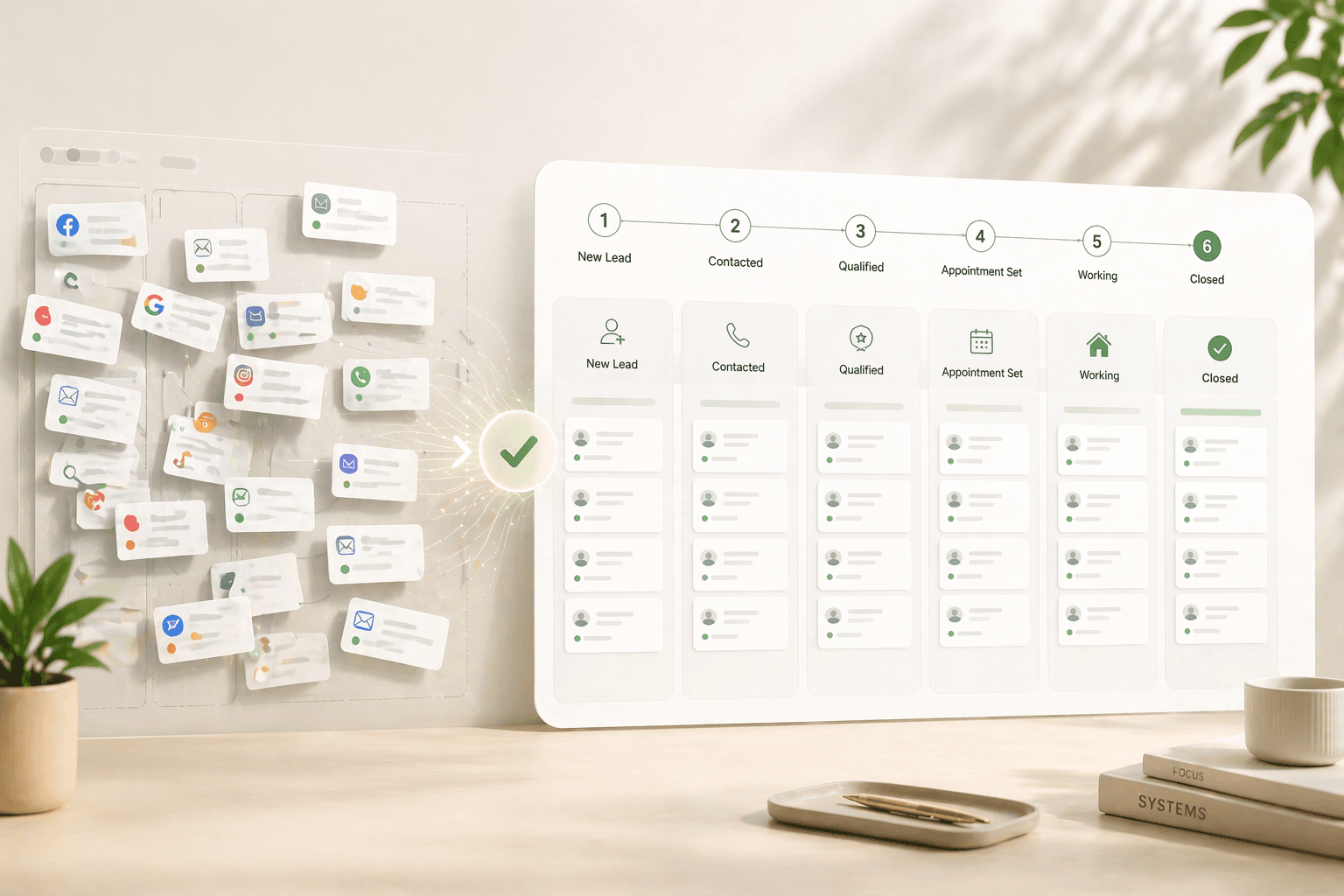
Here are the six stages that work for a buyer pipeline, with their entry triggers and exit criteria written out explicitly:
Stage 1 — New Lead. Entry: lead record created from any source. Exit: first contact attempt made (call, text, or email sent). This stage should be near-empty at any given time. If leads sit here for more than 24 hours, your lead assignment or notification system is broken.
Stage 2 — Contacted. Entry: first outreach sent. Exit: two-way conversation has occurred — the lead has replied or answered. This is where most pipeline leakage happens. According to the MIT and InsideSales.com Lead Response Management Study, agents who contact leads within 5 minutes are 21 times more likely to qualify that lead compared to those who wait 30 minutes. Your automation rules (covered below) need to make this contact automatic.
Stage 3 — Qualified. Entry: you have confirmed budget, timeline, and property type in a two-way conversation. A lead is not qualified because they answered your text — they are qualified when you know three things: what they can spend, when they want to move, and what type of property they need. Exit: showing or listing presentation scheduled.
Stage 4 — Active. Entry: showing scheduled (buyers) or listing presentation completed (sellers). Exit: offer submitted or listing agreement signed. Leads in this stage should get a follow-up within 24 hours of every showing.
Stage 5 — Under Contract. Entry: offer accepted or listing agreement signed. Exit: closing completed or deal falls through. Set a task at entry to calendar every contingency deadline — inspection period, financing contingency, appraisal — because most purchase agreements run on 30-to-45-day escrow windows with hard deadlines.
Stage 6 — Closed / Nurture. Closed deals move to a post-close nurture sequence, not out of the CRM. According to NAR's 2024 data, 40% of buyers used an agent found through referral, and 21% used an agent they had worked with before. Your past clients are your lowest-cost future pipeline — but only if you stay in contact with them systematically after closing.
Essential fields for each lead
More fields means more data entry, which means less data entered. The goal is the minimum set of fields that lets you (a) qualify a lead, (b) personalize follow-up, and (c) forecast your pipeline accurately. That typically resolves to eight fields per lead record.
Contact basics: Full name, primary phone, email. Do not add a secondary phone or secondary email at setup — they create ambiguity about which number to call and rarely improve contact rates.
Lead source: The exact origin — Zillow, website form, Instagram ad, referral from [name], open house at [address]. Do not use a generic "online" tag. The more specific your source data, the faster you can calculate cost-per-closed-deal by channel, which is the only sourcing metric that actually changes your marketing spend decisions.
Budget and timeline: These two fields are the qualification gate. Budget is a range, not a number — "$450K–$600K" or "$450K–$600K." Timeline is a specific window — "3 months," "6–12 months," "not sure yet." If a lead will not give you either, tag them as Long-term Nurture and move on.
Property preference: Type (apartment, villa, plot, townhouse), location preference, and size range. Three sub-fields that take 30 seconds to fill in but make every subsequent follow-up message feel specific rather than templated.
Last contacted date (auto-populated by your CRM) and next follow-up date (set manually at the close of every interaction). Research from BoldTrail indicates that over 60% of deals come from consistent follow-up, yet manual tracking makes systematic follow-up nearly impossible at scale. These two date fields, automated through task triggers, are what solve that problem without requiring agents to remember anything.
The automation rules to set up on day one
Automation does not replace agent judgment — it removes the gap between when a lead arrives and when an agent first engages. That gap is where most real estate deals die. Inman's 2025 Real Estate Technology Survey found that the average agent takes over 15 hours — 917 minutes — to respond to a new lead inquiry. By that point, a buyer has typically contacted two to four other agents.
Stat: Leads contacted within 5 minutes are 100 times more likely to make two-way contact than leads called at 30 minutes, and 21 times more likely to qualify — per the MIT and InsideSales.com Lead Response Management Study authored by Dr. James Oldroyd. — MIT / InsideSales.com Lead Response Management Study
Set these three automation rules before you enter your first lead:
Rule 1 — Instant text acknowledgement. Trigger: new lead record created. Action: send an SMS within 60 seconds. The message should be short and specific: "Hi [First Name], thanks for your inquiry about [property type / location]. I'm reviewing your details and will call you in the next few minutes — does that work?" Do not use a generic "we got your message" auto-reply. Specificity signals you are a real person, not a bot.
Rule 2 — Uncontacted lead drip. Trigger: lead stays in "Contacted" stage for more than 24 hours with no two-way reply. Action: send a second message on day 2, a third on day 4, and a fourth on day 7. After day 7 with no reply, move the lead to a long-term nurture sequence automatically. This sequence keeps you in contact monthly without any manual effort. Velocify's research found that combining fast response with up to 6 follow-up attempts produced significantly better contact rates than either speed or persistence alone.
Rule 3 — Stage-change task creation. Trigger: lead moves from any stage to the next. Action: create a specific task for that new stage. When a lead enters "Qualified," the CRM should automatically create a task: "Schedule showing within 48 hours." When a lead enters "Under Contract," it should create tasks for every contingency deadline in the next 45 days. This rule removes the most common agent failure — knowing what to do but not doing it because nothing reminded them.
These three rules require roughly 45 minutes to configure in any modern CRM. Skip them and your pipeline will feel useful for about three weeks before it becomes a backlog you avoid opening.
Connecting your lead sources
A pipeline with manually entered leads is broken from the start. If an agent has to copy-paste a lead from a portal notification into their CRM, roughly 30% of those leads never get entered — they get "handled" in WhatsApp and then forgotten. Every lead source needs a direct integration that creates a CRM record automatically, with source tagged, the moment an inquiry is submitted.
For US-based agents, the priority list to integrate first includes Zillow, Realtor.com, Redfin, your IDX website, and Facebook Lead Ads. Most major CRMs connect to these through native integrations or Zapier webhooks. The setup time per source is typically 15 to 30 minutes.
NAR's 2025 Technology Survey found that 23% of agents already cite their CRM as their top source of leads — not the portals themselves, but the CRM's ability to capture, route, and re-engage contacts over time. The portals deliver the first inquiry; the CRM determines whether that inquiry becomes a conversation six months later when the buyer is finally ready to act.
Pinova's platform connects IDX property search directly to its built-in CRM, so every property save, search alert, and inquiry from the agent's own website creates a lead record automatically with the property of interest pre-populated — removing the manual step entirely and ensuring the instant text-back rule fires within the required window.
For leads from external portals, test your webhook or integration by submitting a test lead on day one and confirming the record appears in your CRM within 60 seconds. If it takes longer, the automation rule for instant text-back will not fire within the window that matters. Fix the integration before running any paid campaigns.
If you have a team: routing and permissions
Unclear ownership is the silent killer of team pipelines. A lead arrives, three agents assume someone else is handling it, and the lead goes cold. Or two agents contact the same lead within 10 minutes and the prospect feels harassed. Both outcomes are fixable with two rules set at the start.
Rule 1 — Round-robin assignment with hard claim windows. When a new lead arrives, it goes into a shared pool and the first available agent claims it within a defined window — typically 5 minutes. After the window closes, the CRM auto-assigns it to the next agent in the rotation. This keeps response times under 5 minutes without requiring every agent to watch their phone simultaneously.
Rule 2 — Strict permission levels. Agents should see and edit only their own pipeline. Team leads should see all pipelines but edit only their own. Admins have full access. Without permission controls, two problems emerge: agents poach each other's leads accidentally when browsing the team view, and agents feel uncomfortable entering personal client notes because colleagues can read them. Both problems destroy CRM adoption rates within 30 days on any team of three or more.
For larger teams, add a lead scoring layer before routing. Score leads on three dimensions: source quality (referral scores higher than cold portal lead), engagement (replied to the first text scores higher than no reply), and timeline (3 months scores higher than 12 months). Route the top 20% of scores to your highest-converting agents. This is not about giving one agent all the best leads — it is about matching lead quality to the agent whose style converts that type of buyer. Automated lead scoring reduces admin time by 8 to 14% per Cirrus Insight's 2025 CRM research.
Your first 30 days in the pipeline
The pipeline is not fully set up until you have run 30 days of real leads through it and adjusted it once. Most agents over-engineer the setup, run zero leads through it, and call it done. Then the first real lead arrives and reveals three missing fields, one broken automation, and one stage that was never actually needed.
Week 1: Enter your existing contacts manually. Go through your WhatsApp, your email, and your note-taking app. Every lead you have spoken to in the last 90 days goes into the CRM with their source, status, and the next follow-up date filled in. This is the only manual batch entry you will ever do — after this week, every new contact should arrive through an integration.
Week 2: Test every automation rule with a real lead. Submit a test inquiry from your own phone to your website. Confirm the record creates in under 60 seconds. Confirm the text fires. Confirm the task creates. Fix anything that fails before running paid ads.
Week 3: Run your first pipeline review. Block 30 minutes. Open the pipeline and ask three questions: Which leads have had no activity in 7 days? Which stage has the most leads stuck in it? Which source has sent leads that no one has replied to? The answers will point to exactly one or two problems. Fix those problems — do not add new stages or new fields to solve them. The pipeline structure is not what is broken; the process is.
Week 4: Calculate your first real number. Divide the number of leads that moved from "Contacted" to "Qualified" by total leads in "Contacted." That is your contact-to-qualification rate. The industry benchmark for agents using active automation is 15 to 25%. If you are below 10%, the problem is response time. If you are above 25%, you are either in an unusually high-quality lead source or you are qualifying too loosely. Track this number monthly — it is the single metric that tells you whether your pipeline setup is actually working.
By day 30, the pipeline should require no more than 15 minutes of manual review per day. If it requires more, you have too many stages, too many manually triggered tasks, or leads that should have been marked dead three weeks ago. Ruthlessly remove what adds work without adding insight.
| Key Statistic / Finding | Source & Year |
|---|---|
| 43% of buyers start their home search online as their first step | NAR 2024 Profile of Home Buyers and Sellers |
| 88% of home purchases in 2025 were made through a real estate agent or broker | NAR 2025 Profile of Home Buyers and Sellers |
| Average real estate agent response time to a new lead is over 15 hours (917 minutes) | Inman Real Estate Technology Survey, 2025 |
| Agents who respond within 5 minutes are 21x more likely to qualify a lead vs. waiting 30 minutes | MIT and InsideSales.com Lead Response Management Study, Dr. James Oldroyd |
| Leads contacted within 5 minutes are 100x more likely to make two-way contact than leads called at 30 minutes | MIT and InsideSales.com Lead Response Management Study |
| Calling a lead within 1 minute of inquiry produces a 391% improvement in conversion rate vs. waiting longer | Velocify Lead Response Research, 2016 (now part of ICE Mortgage Technology) |
| 70% of real estate professionals use a CRM to manage their sales pipeline; companies using CRM report 41% increase in revenue per sales rep | Straits Research, 2024 (via Wave Connect CRM Statistics) |
| 40% of buyers used an agent found through a referral, and 21% used an agent they had worked with before | NAR 2024 Profile of Home Buyers and Sellers |
| 23% of agents cite their CRM as their top lead source, ahead of portals | NAR Technology Survey, July 2025 (via HousingWire) |
| CRM automation reduces sales cycles by 8–14% and significantly reduces missed opportunities | Cirrus Insight, 2025 (via Wave Connect CRM Statistics) |
Frequently Asked Questions
How many pipeline stages should a real estate agent have?
Six stages is the functional ceiling for most solo agents and small teams. Research consistently shows that pipelines with more than eight stages see sharply lower update rates — not from poor discipline, but because cognitive overhead increases with each additional stage. Keep your buyer pipeline to: New Lead, Contacted, Qualified, Active (showings), Under Contract, and Closed/Nurture. If a stage does not change what you do next, remove it.
Should buyers and sellers be in the same CRM pipeline?
No — build separate pipelines for buyers and sellers from day one. The milestone sequences are completely different: a buyer pipeline tracks inquiry-to-showing-to-offer, while a seller pipeline tracks inquiry-to-listing-presentation-to-signed-agreement. Mixing them creates stages that apply to only half your deals, which makes your pipeline reports inaccurate and your daily priorities confusing.
What is a realistic lead response time target for real estate agents?
Under 5 minutes for any online inquiry. The MIT and InsideSales.com Lead Response Management Study found that agents who respond within 5 minutes are 21 times more likely to qualify a lead compared to those who wait 30 minutes. Despite this, Inman's 2025 Real Estate Technology Survey found the average agent takes over 15 hours to respond. The gap is almost always closed with automation — an instant text-back rule that fires the moment a lead record is created — not with personal discipline alone.
What fields should every lead record have in a real estate CRM?
Eight fields are sufficient for most agents: full name, primary phone, email, lead source (specific, not generic), budget range, timeline, property preference (type + location), and next follow-up date. Adding more fields increases data entry time, which reduces completion rates. The two most commonly skipped fields — budget range and timeline — are also the two that determine whether a lead is worth pursuing immediately or moving to a long-term nurture sequence.
How do I stop leads from going cold in my CRM pipeline?
Set three automation rules: (1) an instant text-back within 60 seconds of any new lead arriving, (2) a 5-day drip sequence for any lead that does not reply within 24 hours, and (3) a stage-change task rule that creates a specific next action every time a lead moves between stages. Together, these three rules eliminate the most common failure points — slow first contact, forgotten follow-ups, and unclear next steps — without requiring agents to remember anything manually.
How long does it take to set up a real estate CRM pipeline correctly?
About 2 hours for initial setup, plus 30 minutes at the end of week 1 to migrate existing contacts, and a 30-minute review at the end of week 3 to fix anything the first real leads revealed. The most common mistake is spending too long on setup and not enough time testing with actual leads. A pipeline with 6 simple stages, 3 automation rules, and real lead source integrations will outperform a 15-stage system with no automation every time.
What metrics should I track in my real estate pipeline after setup?
Track three numbers monthly: contact-to-qualification rate (leads that replied ÷ total leads contacted — target 15–25% for agents using automation), days-to-qualification (how long leads sit in the "Contacted" stage before they qualify or go cold — target under 7 days), and source-to-close rate (which lead source actually produces closed deals, not just volume). These three metrics tell you whether your response time, your qualification questions, or your lead generation spend needs adjustment.
Amaan Sheikh
— Co-Founder & CEOAmaan Sheikh is the co-founder and CEO of Pinova. He sets the product direction, builds the partnerships, and personally works with every founding partner. His focus is making enterprise-grade real estate technology accessible to ambitious agents and teams — without the enterprise price tag.